TM 9-2350-277-34
REPAIR DRIVER’S LEVEL INDICATOR (M901A3 AND M981A3 ONLY)
0064 00
THIS WORK PACKAGE COVERS:
Repair or Replacement (page 0064 00-1).
INITIAL SETUP:
Maintenance Level
Direct Support
Tools and Special Tools
General Mechanic’s Tool Kit (WP 0120 00, Item 62)
Portable Electric Drill (WP 0120 00, Item 7)
Drill Set (WP 0120 00, Item 11)
Materials/Parts
Plate nut (2)
Rivet (4)
Personnel Required
Track Vehicle Repairer 63H10
References
See your -20
Equipment Condition
Driver’s level indicator removed and disassembled
(see your -20)
REPAIR OR REPLACEMENT
1.
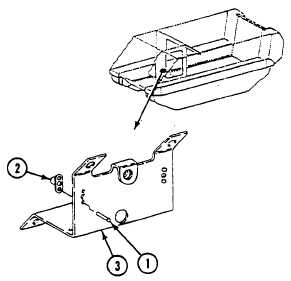
Drill out four rivets (1) and remove two plate nuts (2) from indicator bracket (3). Discard rivets and plate nuts.
2.
Install two new plate nuts (2) on indicator bracket (3) with four new rivets (1).
FOLLOW-THROUGH STEPS
1.
Assemble and install driver’s level indicator (see your -20).
END OF TASK
0064 00-1/2 blank